Tablekeep.PLAY COMPLETE
FRIDAY GAME NIGHT
One for the books.
NICE ONE, MIAA winning finish.
82points
- 02Leo76 pts
- 03Sam68 pts
Mia’s score, at a glance
63Track
2Rows
7Columns
10Colors
A game worth remembering.
GOOD COMPANY. GREAT GAMES.
From quick card rounds to Sunday-afternoon epics. Find your game, check the scores, and keep a little of every game night.
See how scoring worksiPhone and Android 118 games Coming soon
FRIDAY GAME NIGHT
Product preview · Example scores
LESS ADMIN. MORE GAME NIGHT.
The best part of a game night isn’t the final tally. It’s the unlikely comeback, the friendly rivalry, the “one more round.”
Search a growing collection of 118 games, follow the scores as you play, and keep the results together for the next rematch.
Enter the scores and Tablekeep does the math: set bonuses, majorities and tiebreakers. Every scoring field is editable. Check it against your board photo, change a number, and see the total update.
Search by game name or scoring format, or browse the alphabetical collection. From UNO to Terraforming Mars, get to the right scoring sheet without scrolling through every title.
Save the players, date, scores, photos and a note about the night. Revisit plays and export their score data. Manual scoring and saved history work offline without sign-in.
A PICTURE. A CHECK. EVERY POINT.
Add a picture to keep the details in view. Enter or correct the scoring fields, then let Tablekeep work out the total. You’re always in control of the numbers.
KEEP THE DETAILS
Take a clear picture from above, with the scoring areas in view. Attach it to the play so you can check the board as you enter each player’s numbers.
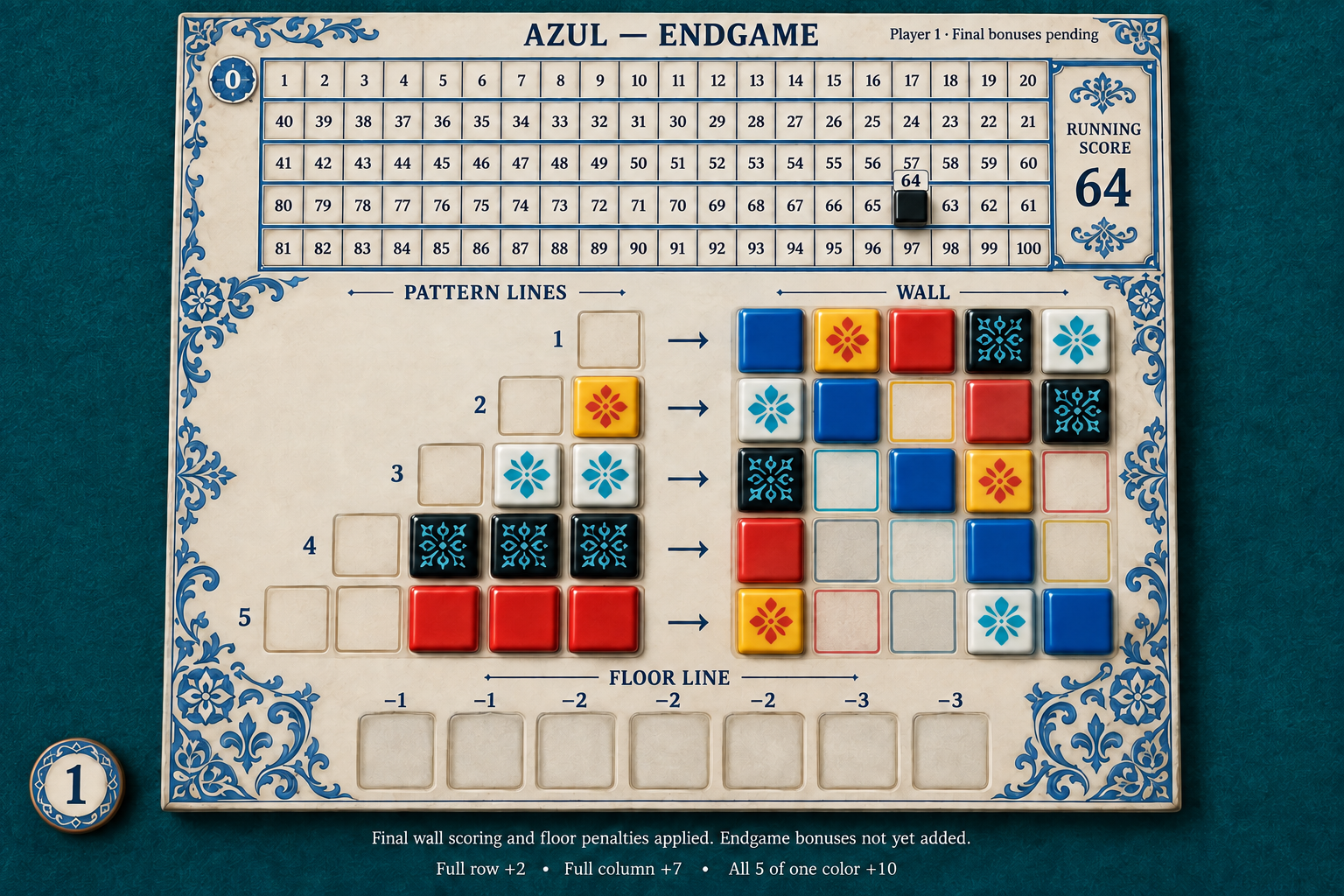
A useful photo shows the whole scoring area. Keep tiles, cards and score markers visible; avoid glare and overlapping pieces.
TRY IT BELOW
These numbers match the illustrated board. Edit a value to see how the score changes—just as you can when reviewing a play.
SEE WHERE EVERY POINT CAME FROM
Review each player’s breakdown before confirming and saving the play.
64 + 2 + 14 + 10
Running score + end bonuses
Supported iPhone test builds can suggest scoring details from an Azul photo. Choose whether to use the suggestions, check them against the board, and edit anything before confirming. Other games use manual entries and optional reference photos. Cloud assistance needs an internet connection.
41 GAMES WITH ONGOING SCORING
Rounds, hands, turns or whole matches: 41 games keep a running total as you play. Enter each result and see where everyone stands before the next deal.
SUSHI GO! · 3 PLAYERS
| Player | R1 | R2 | R3 | So far |
|---|---|---|---|---|
| Leo | 17 | 24 | – | 41 |
| Mia | 21 | 18 | – | 39 |
| Sam | 12 | … | – | 12 |
Example scores
NEXT UPDATE · IN DEVELOPMENT
Your saved plays are getting a view of their own. Open a game’s history to see who’s winning, how scores compare, and which categories have tended to make the difference.
Favourites and these history insights are in development for a future test build. History insights work offline.
SIX NIGHTS AROUND THE TABLE
| Player | Wins | Win rate |
|---|---|---|
| Mia | 3 / 6 | 50% |
| Leo | 2 / 6 | 33% |
| Sam | 1 / 6 | 17% |
Where do the extra points come from?
Development preview · Example scores
A LITTLE HELP WITH THE NEXT MOVE
Choose a player, ask a question, and get AI strategy advice based on the scores and game details you’ve entered.
The coach can’t see your hand or read the board. Its advice doesn’t change your scores; Tablekeep’s scoring rules still do the math.
PHONES DOWN. GAME ON.
THE GROWING COLLECTION
Now including No Thanks!, SCOUT, Verdant and River Valley Glassworks, alongside favourites like UNO, Wingspan and Terraforming Mars. Search by name or scoring format in the app, with a dedicated scoring sheet for each game.
Score as you go 41 games support rounds, hands, turns, seasons or match results.
Counts reflect the formats supported by the app. Enter each partnership as one team. Game coverage means scoring support; photo recognition is experimental and limited to Azul.
FROM LAST MOVE TO NEXT TIME
A thoughtful little ritual for game night. Score round by round as you play, or all at once when the last move is made.
118 games · iPhone and AndroidSearch for your game and add everyone at the table, or enter partnerships as teams. Add optional board photos when they help you review the scores.
Enter each round or the final scoring details. Check the numbers against the photo, edit anything that needs correcting, and review the updated breakdown before confirming.
Add the date and a note, then save the play. Find it in History when someone asks, “Who won last time?”

YOUR NEXT GAME-NIGHT COMPANION
Tablekeep for iPhone and Android is coming soon.
We’re getting the little things right.
Tablekeep is in development for iPhone and Android, with test builds distributed through TestFlight and Firebase App Distribution. There is no announced public store release date yet. Features marked “Next update” are being prepared for a future test build.
118 games, from UNO, Cribbage and Boggle to Wingspan, Wyrmspan, Scythe and Terraforming Mars. Browse the complete collection for the supported player counts, editions and scoring formats. These are scoring sheets; automatic photo recognition does not cover the whole collection.
Yes. 41 games support ongoing scoring, including hands in Hearts, turns in Scrabble, seasons in Cartographers and rounds in Sushi Go Party! Tablekeep keeps running totals, and unfinished games stay saved on your device.
The next update adds history grouped by game, leaderboards, wins, win rates, average and best scores, winning margins, and scoring patterns. Those insights run on your device. An online coach review of recent saved plays is also in development.
No. Photo suggestions are experimental and limited to Azul on supported iPhone builds. You choose whether to apply a suggestion, then check and edit its values. Other games use manual scoring, with optional photos as a reference.
Yes. The scoring fields stay editable. Correct a count or score and Tablekeep recalculates the breakdown. Each player’s score is reviewed before saving. If you change a confirmed value, you’ll review it again.
The coach uses the game, scoring details and question you choose to send. It does not see your hand, hidden cards, board or photos. The upcoming history review uses summaries of up to 30 saved plays. Advice can be imperfect and never changes the scores.
Manual scoring and saved history work offline without sign-in. Cloud coaching and photo assistance require internet and have daily limits. Sign-in is optional where available; it does not sync your local play history. Subscriptions are currently switched off during testing.